


Introduction
Every single day, businesses are losing potential new customers for a variety of reasons; however, the most common reasons for losing customers today are due to poor customer follow-up, scattered customer data, and poor owner communications. CRM Software was developed to help you manage each of these issues.
From a startup-level business to a large Fortune 500 Company, CRM Tools have emerged as the primary resource for managing relationships with customers. They turn disorder into organized and structured process, allowing teams to keep track of each interaction, transaction and lead from one location.
What is CRM Software?
CRM is short for ‘Client Relationship Management’. A CRM software platform enables you to manage your client information (i.e.. Who Has bought from you?).What are they buying from you? What communication history have you had with the customer? Streamline their sales process and track their customer interactions, all through one centralized system.
The main purpose of a CRM is to organize your customers’ data, so that you may build a stronger relationship with your clients, close more sales, and retain more clients.
How CRM Software Works
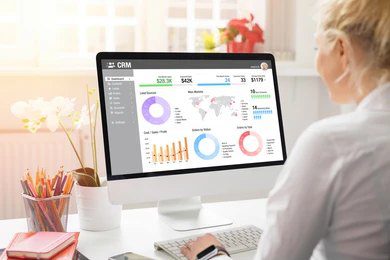
A CRM collects information from multiple sources (leads and customers) – emails, emails and phone calls, website visits, and social media. All this information is stored in one database location that is accessible to the team members involved in serving the customer.
Once the data has been stored in an orderly manner, automating tasks such as assigning leads to team members, sending reminders to follow up with leads and customers, and creating workflows based on client actions will enable your management team to effectively have access to all data needed to make better and faster decisions than they would otherwise be able to do without it.
Types of CRM Software
Operational CRM
Operational CRM provides businesses with the capability to automate everyday operations (sales, marketing, and customer service) to better manage leads, track business transactions through a sales funnel, and successfully manage and support their customers without having to manually do it all. Some examples of operational CRM systems include Salesforce and Zoho CRM.
Analytical CRM
Analytical CRM focuses on leveraging a company’s customer data to analyze patterns and predict future behavior of customers to assist in making better informed business decisions. Companies that heavily depend on information and use it to create highly customized campaigns and predict customer attrition can significantly benefit from implementing an analytical CRM solution. One example that excels at this is Microsoft Dynamics 365.
Collaborative CRM
Collaborative CRM provides companies with the ability to share customer information amongst all departments — including sales, customer support, and marketing. Using a common set of data improves the overall customer experience by eliminating miscommunication across departments.
Key Features of CRM Software
Contact Management — Customer profiles, communication logs and history of interactions can all be stored together using CRM customer information management capabilities.
Sales Tracking — You can track deals through stages of the sales pipeline and mark deals that have not progressed as expected.
Automation — You can automate many common tasks associated with CRM, including lead distribution, email series, and reminders for follow-up.
Reporting Dashboards — You have access to current revenue information, how well the sales team is performing, and what new customer trends you see in your business.
Integration APIs — This allows you to integrate your sales processes with other applications such as Gmail, Slack, Shopify and Accounting Applications.
Popular CRM Software: Technical Overview Salesforce
Salesforce is the leading supplier of enterprise-level CRM software. It features extensive customization options, an advanced artificial intelligence component known as Einstein, and integrates with multiple external application suppliers that can be found in their AppExchange marketplace. The features provided by Salesforce provide tremendous benefits to large organizations with diverse selling processes.
Zoho CRM
Zoho CRM provides substantial functionality at a low cost, and provides multi-channel communication, automated workflows, and sophisticated analytical capabilities. Organizations that leverage the Zoho ecosystem to a greater degree will be able to take the greatest advantage of its tightly integrated technology.
HubSpot CRM
HubSpot CRM is a top option for companies that are experiencing growth. The free version of HubSpot CRM is legitimate; the offered paid options are highly scalable. HubSpot CRM contains many of the functions your organization would need, such as Operations, CRM, Marketing Hub, Sales Hub, and Service Hub. As a fully integrated solution, you can manage and grow your entire business using HubSpot’s CRM.
Microsoft Dynamics 365
When you implement Dynamics 365 for your organization, you can expect to receive a purpose-built solution that supports organizations using Microsoft systems. In addition, Dynamics 365 has integrated CRM and ERP functions and also integrates with Microsoft Office 365 and Azure. Furthermore, Dynamics 365 has Power BI, the advanced analytics tool from Microsoft.
Cloud-Based CRM Software
Cloud-based CRMs operate as complete Software as a Service (SaaS), i.e., you are subscribed to a cloud-based service that is hosted on web servers and accessed using web browsers or apps. Thus, you do not have to maintain hardware, and there is no long implementation schedule for you.
The efficiencies provided through a cloud-based CRM solution are significant. Cloud-based CRMs allow teams to have real-time access to information via any device, and with cloud-based CRMs, there are automatic updates to the software, inherent security protocols in place to prevent unauthorized access to the data, and predictable subscription pricing. For remote or hybrid workplace environments, utilizing a cloud-based CRM is essential, not optional.
Free vs Paid CRM Software
HubSpot offers free plans that provide small teams with contact management, deal tracking, and basic reporting functionality for free. They are great to start with, but they do have limitations — such as a capped number of users, limited storage space, and limited automation opportunities.
However, once you upgrade to a paid plan, you unlock features such as more advanced workflows and access to AI features, deeper analytics, and priority support. As your team grows and your pipeline becomes more complex, investing in a paid plan will quickly pay off.
How to Choose the Right CRM Software

When determining which type of plan is best for your company, consider your team’s size. A startup with five employees has very different needs than a 200-person sales team. Next, identify what your primary use case will be — lead management, customer support, or marketing automation.
Lastly, conduct an audit of your existing tool set. The best CRM for your company will integrate seamlessly with what you already have in place. And most importantly, test the software out before you purchase. Many platforms have free trial periods, and the experience you gain from using the software before making a purchase will outweigh any list of features the platform may have.
Use Cases: Technical and Practical
Sales Pipeline Tracking — CRM software enables users to map deals from first contact through to when they are closed as won, resulting in better visibility of potential loss of opportunity for sales managers.
Customer Support — Support teams track and log tickets and have access to the full customer history, as well as resolution times, enabling support teams to respond more quickly and in a more personalized manner.
Marketing Automation — Marketers utilize data from CRM systems to segment audiences, create email campaigns, and measure the success of their email campaigns against actual revenue.
Challenges of CRM Systems
There are many things to contend with when implementing a customer relationship management system (CRM) – the first hurdle is data complexity. Migrating your existing customer records and keeping them up-to-date will require ongoing effort. The second challenge is integration. Not every CRM integrates perfectly with existing legacy systems.
Getting your team to actually use the CRM is the biggest challenge of all. The best sales and marketing CRM will provide no value to your company if your team does not use it. Therefore, proper onboarding and training are of the utmost importance on day one.
Future Trends in CRM
Artificial intelligence-powered CRM is here. With companies like Salesforce Einstein and HubSpot now utilizing AI to score leads, draft emails, and predict outcomes, we can expect to see predictive analytics becoming the norm. Additionally, as hyper-automation continues to grow, there will be almost no need for manual data entry. CRM integrations will no longer just be done through a computer screen but through voice and chat interfaces, too.
Conclusion
Whether you choose a free version or an enterprise platform, if you want your company to succeed, have retention, and operate efficiently, you’ll need to invest in the correct CRM. The right CRM will give your team the visibility to make decisions and the data needed to improve.
FAQ
What is CRM software? CRM software refers to a program that is used to help companies track their customers and manage how they interact with their clientele (through an ordered system). Essentially, it allows instant access to every piece of information that your company has collected about its customers so your team can have everything in one location for them to convert and retain customers on behalf of your organization.
What are examples of CRM software? Examples of CRM programs are Zoho CRM, Salesforce, HubSpot CRM, and Microsoft Dynamics 365. The majority of these software packages have a diverse array of features (as well as various sizes and types of teams they can be used by). Organizations like Salesforce offer these types of programs to small organizations (such as retail stores) and large organizations (such as corporations).
What is cloud-based CRM software? Cloud-based CRM systems differ in that they can be accessed through an internet connection instead of being installed directly on computers. As a result of hybrid connectivity for cloud-based systems, users can access their data from any computer (or device) with an internet connection. Cloud-based networks also automatically get updated with the newest version of the software, as it is hosted on a cloud platform.
Is CRM software free? There are several software vendors that have free CRM plans available. HubSpot’s free CRM plan is one of the most capable free plans available. Most vendors with free plans have restrictions as to the number of users and/or features associated with the software.
Which CRM software is best? The best CRM program depends on three critical items associated with your business: your size, your goals, and your budget. For example, HubSpot is an excellent choice for growing companies, while Salesforce is a better choice for larger companies needing complex systems. On the flip side, Zoho CRM is still a good choice for medium-sized companies.
