




Introduction
Your iPhone 16 Pro Max deserves more than a default screen. Since the lock screen is the first thing you see every time you pick up your phone, selecting the right iPhone 16 Pro Max lock screen wallpaper enhances your overall user experience.
High-quality wallpapers do more than look good. They enhance and complement your widgets, improve readability, and reflect your personality. Whether you prefer clean minimalism or bold abstracts, the right design makes every unlock feel intentional.
Why the Right Lock Screen Wallpaper Actually Matters
Most people underestimate how much wallpaper affects daily phone use. A poorly chosen background can hide the time display, interfere with notification visibility, or negatively affect the visual experience.
The iPhone 16 Pro Max features a 6.9-inch Super Retina XDR display with ProMotion technology. That screen deserves wallpaper that matches its capability. A sharp, high-resolution image enhances the OLED panel’s depth, while low-resolution wallpapers can appear pixelated and dull on the lock screen.
Personalization matters too. Your lock screen sets the tone before you even open an app.
Best Types of iPhone 16 Pro Max Lock Screen Wallpapers
Minimal Wallpapers
Clean backgrounds with soft gradients or single-subject compositions work beautifully. They keep the time and date readable without distraction.
Nature Wallpapers
Mountain landscapes, ocean waves, forest paths, and macro flowers deliver stunning detail on the Pro Max display. Nature photography in 4K resolution uses the full dynamic range of the screen.
Abstract Designs
Geometric patterns, fluid art, and gradient abstracts create visual interest without overwhelming the screen. These pairs work well with iOS widget styles.
Dark Mode Wallpapers
Deep blacks and dark tones help reduce eye strain, especially in low-light environments. Dark wallpapers also benefit OLED displays by consuming less power when blacks are rendered as true off-pixels.
Aesthetic and Premium Wallpapers
Cinematic stills, luxury textures like marble or brushed metal, and artistic illustrations can significantly enhance the appearance of your device. These work especially well if you maintain a cohesive home screen theme.
Ideal Resolution for iPhone 16 Pro Max Wallpapers

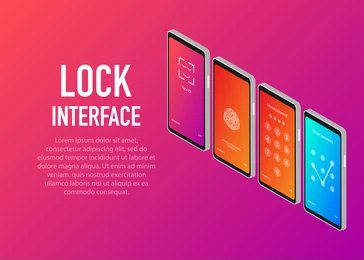
The iPhone 16 Pro Max screen resolution sits at 1320 x 2868 pixels at 460 ppi. For the sharpest result, use wallpapers at or above this resolution.
iPhone wallpaper HD images start at 1080 x 1920 pixels and remain acceptable, but iPhone wallpaper 4k files deliver a noticeably crisper result on the Pro Max panel. The aspect ratio you want is approximately 9:19.5 to avoid cropping important parts of the image.
Always download the highest resolution version available. A stretched low-resolution image looks particularly bad on a premium display.
Where to Find iPhone 16 Pro Max Lock Screen Wallpapers
Free Platforms
- Unsplash: High-resolution photography, free to download
- Pexels: Curated HD images across every category
- Apple’s own wallpaper library inside iOS 18 settings
Premium Platforms
- Zedge: Offers themed packs and artist-made collections
- Vellum: Specifically designed for iPhone wallpapers with curated aesthetics
- Pinterest: Excellent for discovering aesthetic themes and linking to sources
Custom Creation Tools
- Canva: Design your own wallpaper with custom dimensions (1320 x 2868 px)
- Adobe Express: Professional-grade templates for phone backgrounds
- Unfolder: Built specifically for iPhone wallpaper sizing and preview
How to Set a Lock Screen Wallpaper on iPhone 16 Pro Max
Setting your iPhone 16 Pro Max lock screen wallpaper takes under a minute.
- Long-press on your current lock screen until the customization menu appears
- Tap the plus icon to create a new lock screen
- Select “Photos” to use your own image or choose from Apple’s wallpaper library
- Pinch and zoom to adjust the crop and positioning
- Tap “Add” then “Set as Wallpaper Pair” or choose lock screen only
- Preview the result and confirm
iOS 18 also lets you add widgets, change font styles, and adjust the clock color directly within this same customization screen.
Tips for Choosing the Best Wallpaper

Keep these points in mind before you commit to a design.
Prioritize text visibility. The time, date, and notifications sit on top of your wallpaper. A busy or high-contrast background makes these hard to read. Soft, blurred, or darker images in the upper portion of the image work best.
Match your widget aesthetic. If you use weather, fitness, or calendar widgets, choose a wallpaper that does not clash with those UI elements visually.
Consider dark versus light. Dark wallpapers conserve OLED battery life and reduce eye strain. Light wallpapers feel fresh and clean during daytime use. Match your choice to your habits.
Avoid over-cropping. Use an image with enough resolution so that zooming in does not pixelate the subject.
Common Mistakes to Avoid
Many users set a wallpaper quickly and live with issues they could easily fix.
Using low-resolution images is the most common problem. A 500-pixel-wide image stretched across a nearly 3000-pixel display looks blurry and amateurish.
Overly bright or pure-white backgrounds cause glare in low-light environments and make notification text invisible. Avoid stark whites unless contrast is carefully managed.
Ignoring the lock screen layout causes poor cropping. Always preview the image in the lock screen editor before confirming. Pay attention to where the clock sits and whether it overlaps a face or an important detail in the image.
Skipping the depth effect option is another missed opportunity. iOS 18 supports a depth effect on certain wallpapers, pushing the clock behind foreground subjects for a layered, immersive look.
Conclusion
Selecting the right iPhone 16 Pro Max lock screen wallpaper is a small decision that makes a big difference in daily use. A well-chosen wallpaper improves display sharpness, ensures better readability, and allows you to personalize your device while maintaining a clean visual experience.
Stick to HD or 4K resolution files, use trusted sources for downloads, and take a few extra seconds to preview and align your wallpaper properly. Your Pro Max display is one of the best screens ever put in a phone. Give it a wallpaper that lives up to that standard.
Frequently Asked Questions
What is the best resolution for the iPhone 16 Pro Max lock screen wallpaper? The ideal resolution is 1320 x 2868 pixels at 460 ppi. Using 4K images ensures the sharpest result on the Super Retina XDR display without any visible pixelation.
Where can I download iPhone 16 Pro Max lock screen wallpapers in HD or 4K? Unsplash, Pexels, Vellum, and Zedge are reliable sources. For custom designs, Canva lets you set exact iPhone 16 Pro Max dimensions before exporting.
How do I set a lock screen wallpaper on iPhone 16 Pro Max? Long-press the lock screen, tap the plus icon, select your image, adjust the crop, and tap Set as Wallpaper Pair. The entire process takes less than a minute.
Can I use live wallpapers on the iPhone 16 Pro Max lock screen? Yes. iOS 18 supports Live Photos as lock screen wallpapers. The animation plays when you tap or raise the phone, adding subtle motion to your screen.
What type of wallpaper is best for lock screen visibility? Minimal or dark wallpapers with clear negative space in the upper centre area work best. They keep the clock and widgets legible without visual clutter.
How do I create a custom lock screen wallpaper for iPhone 16 Pro Max? Use Canva or Adobe Express, set the canvas to 1320 x 2868 pixels, design your layout, export at maximum quality, and set it via the iPhone lock screen editor.
Why does my wallpaper look blurry on my lock screen? The image resolution is too low for the display. Replace it with a file of at least 1080 x 1920 pixels, ideally 4K, to restore sharpness across the full screen.